Show Studio
The whole show on one timeline.
Show Studio is the show control of the nanoblue platform: lighting, video, audio and equipment live as cues on tracks – designed in the browser, played back right on the device, precisely on time.

From museum rooms to product shows
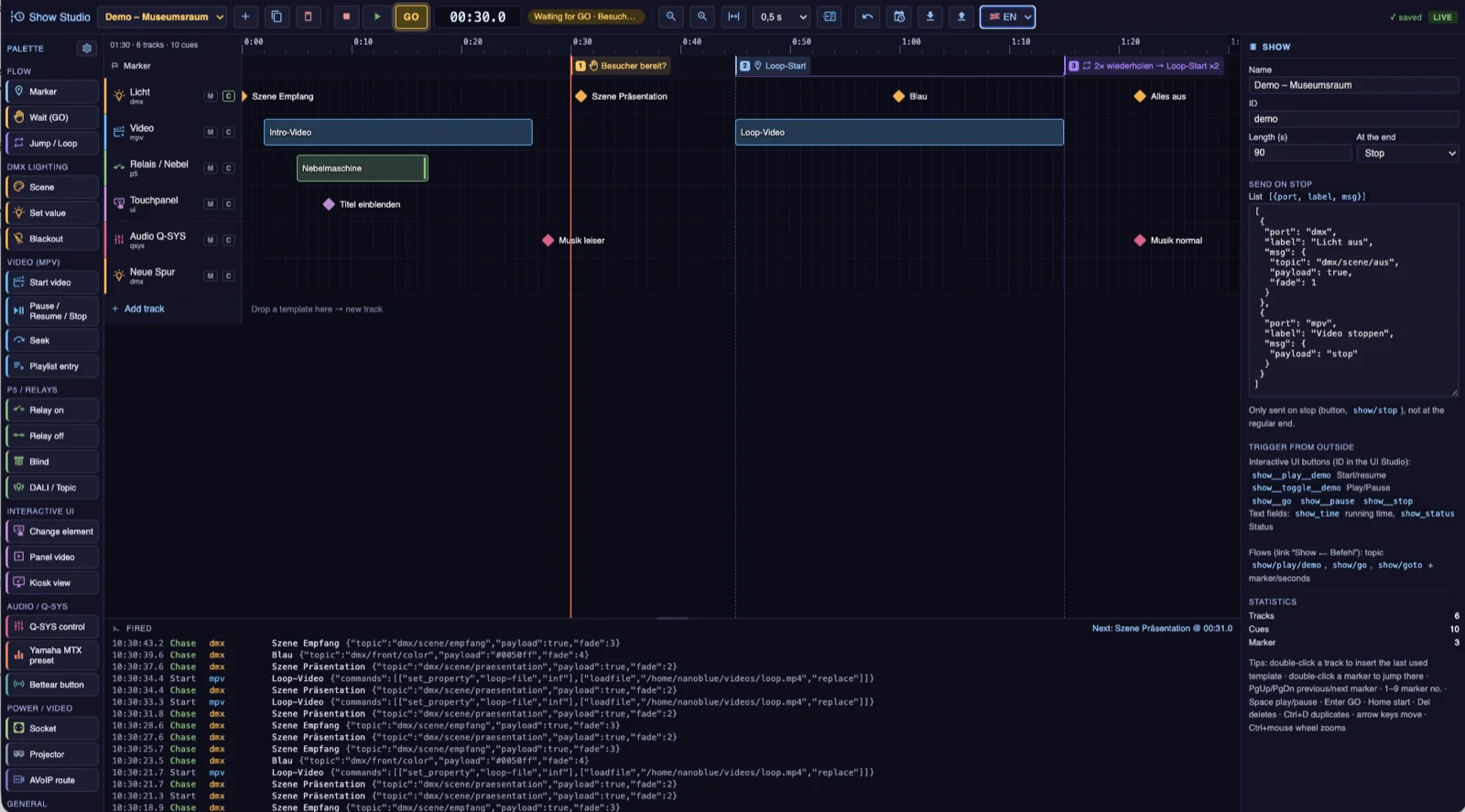
In Show Studio the sequence comes together like in an editing suite: cues sit on tracks and send commands to your equipment at exactly the right moment – DMX lighting, relays, blinds and DALI, video playback on the Media Player, Q-SYS, projectors, AVoIP routes, switchable power outlets, HTTP and MQTT. Templates for each discipline make authoring a drag-and-drop job, wait markers hold the show until the GO arrives – from a button, TouchPoint, NFC or user interface –, jumps and loops repeat sections, and the schedule starts the show automatically at opening time.
Playback happens right on the nanoblue device, not in the cloud: the show keeps running reliably even if the internet connection drops. And if no hardware is connected yet, you can try the sequence in the built-in browser simulation – every command shows up in the log before it ever reaches real equipment. Via the optional Cloud Server, every function is also available remotely – edit, start and monitor shows without being on site.
What's inside
Timeline editor
Tracks and cues via drag-and-drop, templates for every discipline, duration and position freely adjustable – all in the browser.
Waiting for GO
Wait markers hold the show until visitors or staff give the GO – via button, NFC or user interface.
Loops & jumps
Sections repeat endlessly or n times – ideal for attract loops that continue at the press of a button.
Every discipline
Lighting (DMX/DALI), relays and blinds, video, audio, projectors, AVoIP, power outlets, HTTP and MQTT – vendor-independent.
Schedule
Shows start and stop automatically by time and weekday – the exhibition opens itself.
Runs on the device
Playback runs directly on the Media Controller or Media Player – independent of the internet connection; with simulation for testing without hardware.