

Symetrix Jupiter
Symetrix Jupiter. Control in the room.
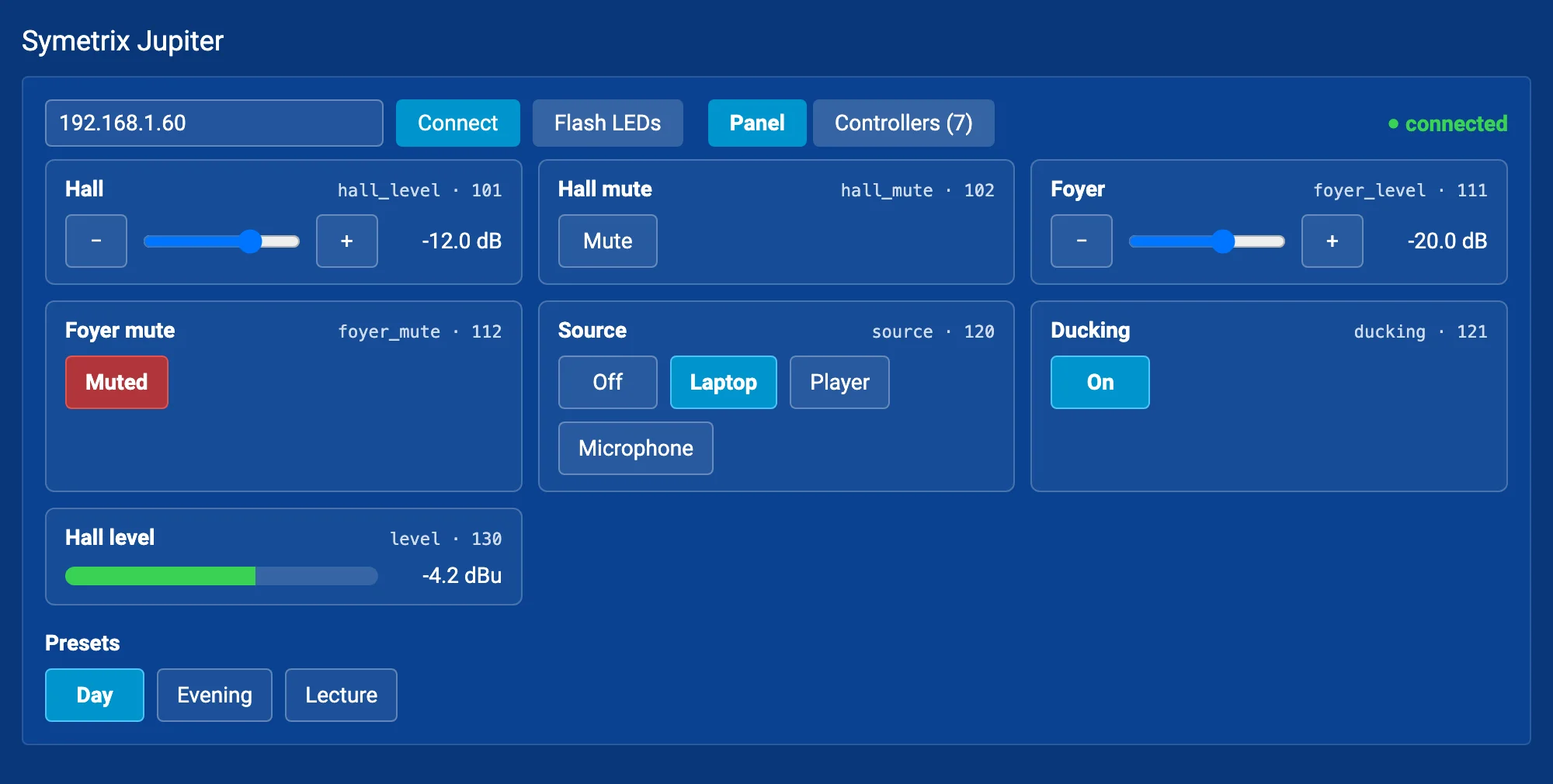
nanoblue controls the Symetrix Jupiter 4, 8 and 12 audio DSPs through the manufacturer’s Jupiter Control Protocol interface: level, mute, source selection, switches, presets and level meters – with feedback and without touching the app of the DSP.

A controller list makes every app operable
A Jupiter works with ready-made apps, for example for zone mixing, paging or conference rooms. Every parameter of an app has a fixed controller number, which the Jupiter software shows. The dashboard has a controller list for this: one row per parameter that is to be operated, with name, type and number. One click reads the current value of a number from the DSP – during commissioning this quickly shows whether it belongs to the intended control. The list can be saved as a file and loaded again for further systems with the same app. If a number does not exist in the loaded app, the parameter is marked at once.
After that every parameter is available in the Interactive UI: sliders for level, buttons for mute, sources, switches and presets, bars for the level meters. The DSP confirms every command and reports changes by itself – including when a setting is changed on one of the manufacturer’s wall panels or a preset is recalled. Room scenes, schedule and sequences use the same functions. The control has been tested in test mode; it is verified on the device during commissioning.
- Level in dB as a slider or in steps
- Mute, source selection, switches and presets by button
- Level meters and feedback, every command confirmed
- Controller list per project, import and export as a file
- Interactive UI via ID, no programming
One system, many brands
Netgear
Configure and monitor AV Line switches.
Learn more → 3rd Party APIDante
Audio routing across the Dante infrastructure.
Learn more → 3rd Party APIQ-SYS
Control Q-SYS cores natively via QRC.
Learn more → 3rd Party APIYamaha
Native control for DME DSPs.
Learn more → 3rd Party APIBSS Soundweb
Direct control for Soundweb London DSPs.
Learn more → 3rd Party APILinea Research
Operate and monitor M and C Series amplifiers.
Learn more → 3rd Party APIBiamp Tesira
Operate Tesira DSPs directly.
Learn more → 3rd Party APISennheiser
Operate and monitor ceiling, video bar and wireless microphones.
Learn more → 3rd Party APIShure
Operate and monitor the MXA920 ceiling microphone and ULX-D wireless receivers.
Learn more → 3rd Party APIEcler
Operate HUB zone managers and the eMIMO1616 matrix.
Learn more → 3rd Party APILightware
Taurus UCX switchers via REST API.
Learn more → 3rd Party APIPureLink
Switchers, matrices & VB-300-PRO video bar.
Learn more → 3rd Party APIPlexusAV
AVoIP matrix with JPEG XS & H.26x.
Learn more → 3rd Party APITurtle AV
AV over IP with Chazy 4K and Dante AV-A.
Learn more → 3rd Party APItvONE
CALICO PRO: presets and sources via REST API.
Learn more → 3rd Party APIAnalog Way
Operate LivePremier image processors from a touch panel.
Learn more → 3rd Party APIBettear
Auracast broadcast audio & assistive listening.
Learn more → 3rd Party APIGude
Switchable PDUs: measure & switch power.
Learn more → 3rd Party APIBlaze
Control & monitor PowerZone amplifiers.
Learn more → 3rd Party APIPixera
Media servers for shows & installations.
Learn more → 3rd Party APIAllen & Heath
Remote-control mixing consoles & matrices.
Learn more → 3rd Party APIAllen & Heath IP-8
IP-8 fader controller – no audio processor.
Learn more → 3rd Party APIAvonic
Pan, zoom and preset PTZ cameras.
Learn more → 3rd Party APISharp
Native control for pro displays.
Learn more → 3rd Party APIViewSonic
Operate CDE14 series commercial displays over the network.
Learn more → 3rd Party APIXilica
Control & monitor audio DSPs.
Learn more → 3rd Party APIBitfocus Companion
Link Stream Decks directly to the function logic.
Learn more → 3rd Party APIMIDI/OSC
Connecting audio worlds natively.
Learn more → 3rd Party APIDMX
Control lighting via Art-Net & sACN.
Learn more → 3rd Party APIDALI
Professional lighting control seamlessly connected.
Learn more → 3rd Party APIKNX
Building automation seamlessly connected.
Learn more →