

ViewSonic
ViewSonic. Displays that play along.
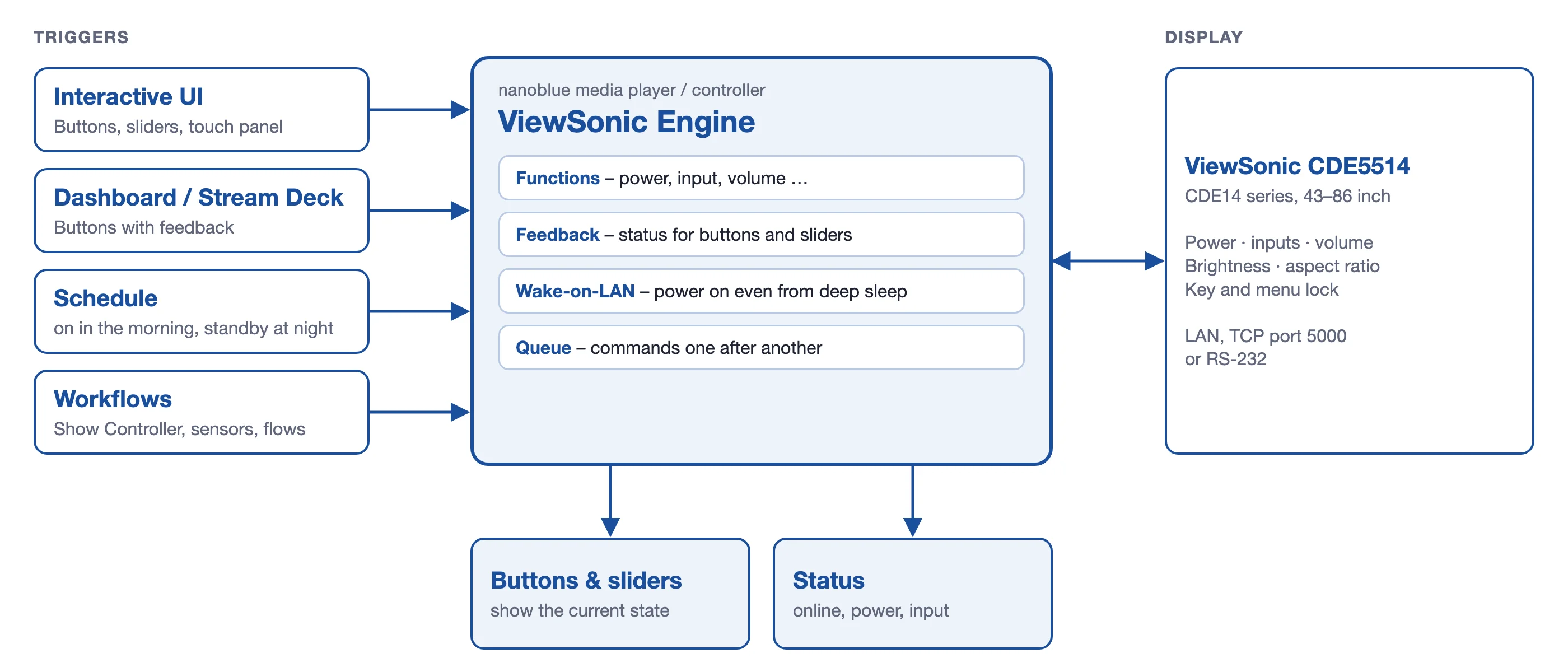
nanoblue controls the ViewSonic CDE14 series commercial displays through the manufacturer’s network interface: power, inputs, volume, brightness and locks – with feedback and power-on via Wake-on-LAN.

On at the right time, on the right input
CDE14 series displays hang in meeting and training rooms, reception areas and shops. In everyday use nobody should have to look for the remote control: the display should be on at the right time, show the right input and go off again in the evening. With nanoblue this is on the touch panel or runs on the schedule: on and standby, input selection, volume and mute, brightness, contrast and aspect ratio. In public areas the buttons on the display, the menu and the remote control can be locked.
Whether a display still accepts network commands in standby depends on its power save mode. nanoblue copes with both cases and wakes the display via Wake-on-LAN when needed. After power-on a display needs a few seconds before it accepts further commands – nanoblue keeps this pause by itself and works through all commands in order. The state is polled regularly and fed back to buttons and sliders; if the display cannot be reached, it is shown as offline. The control has been tested in test mode; it is verified on the device during commissioning.
- On / standby, also via Wake-on-LAN
- Inputs, volume, mute and brightness
- Lock buttons, menu and remote control
- Command sequences without manual waiting
- Schedule, room scenes and Interactive UI
One system, many brands
Netgear
Configure and monitor AV Line switches.
Learn more → 3rd Party APIDante
Audio routing across the Dante infrastructure.
Learn more → 3rd Party APIQ-SYS
Control Q-SYS cores natively via QRC.
Learn more → 3rd Party APIYamaha
Native control for DME DSPs.
Learn more → 3rd Party APIBSS Soundweb
Direct control for Soundweb London DSPs.
Learn more → 3rd Party APILinea Research
Operate and monitor M and C Series amplifiers.
Learn more → 3rd Party APISymetrix Jupiter
Operate Jupiter DSPs directly.
Learn more → 3rd Party APIBiamp Tesira
Operate Tesira DSPs directly.
Learn more → 3rd Party APISennheiser
Operate and monitor ceiling, video bar and wireless microphones.
Learn more → 3rd Party APIShure
Operate and monitor the MXA920 ceiling microphone and ULX-D wireless receivers.
Learn more → 3rd Party APIEcler
Operate HUB zone managers and the eMIMO1616 matrix.
Learn more → 3rd Party APILightware
Taurus UCX switchers via REST API.
Learn more → 3rd Party APIPureLink
Switchers, matrices & VB-300-PRO video bar.
Learn more → 3rd Party APIPlexusAV
AVoIP matrix with JPEG XS & H.26x.
Learn more → 3rd Party APITurtle AV
AV over IP with Chazy 4K and Dante AV-A.
Learn more → 3rd Party APItvONE
CALICO PRO: presets and sources via REST API.
Learn more → 3rd Party APIAnalog Way
Operate LivePremier image processors from a touch panel.
Learn more → 3rd Party APIBettear
Auracast broadcast audio & assistive listening.
Learn more → 3rd Party APIGude
Switchable PDUs: measure & switch power.
Learn more → 3rd Party APIBlaze
Control & monitor PowerZone amplifiers.
Learn more → 3rd Party APIPixera
Media servers for shows & installations.
Learn more → 3rd Party APIAllen & Heath
Remote-control mixing consoles & matrices.
Learn more → 3rd Party APIAllen & Heath IP-8
IP-8 fader controller – no audio processor.
Learn more → 3rd Party APIAvonic
Pan, zoom and preset PTZ cameras.
Learn more → 3rd Party APISharp
Native control for pro displays.
Learn more → 3rd Party APIXilica
Control & monitor audio DSPs.
Learn more → 3rd Party APIBitfocus Companion
Link Stream Decks directly to the function logic.
Learn more → 3rd Party APIMIDI/OSC
Connecting audio worlds natively.
Learn more → 3rd Party APIDMX
Control lighting via Art-Net & sACN.
Learn more → 3rd Party APIDALI
Professional lighting control seamlessly connected.
Learn more → 3rd Party APIKNX
Building automation seamlessly connected.
Learn more →